Captio AI: Live Captions App That Shows Who Is Speaking
Author: Nejc Dovžan Kukić
Published: 27 Oct 2026
Publication Type: Product Release, Update
Table of Contents:
Synopsis - Definition - Overview - FAQs - Insights, Updates - Related Content
Synopsis
This product is a live captioning app for iPhone, iPad and Android that turns spoken conversation into large, high-contrast text on the phone screen, captioning speech in 60 languages with menus and settings offered in 46 languages. Built for deaf and hard of hearing people, Captio AI goes beyond word-for-word transcription by labeling each line with the name of a known speaker and, on iPhone 16 and later models, showing which direction a voice is coming from. That matters most in group settings, where keeping track of who said what is often harder than reading the words themselves, a problem the Deaf community calls dinner table syndrome. The World Health Organization estimates that 430 million people, more than 5 percent of the world's population, need rehabilitation for disabling hearing loss, a figure projected to pass 700 million by 2050, and it lists captioning among the services that support them. A two-way translation mode with a split screen also lets two people who speak different languages read each other's words, which makes the app practical for older adults with age-related hearing loss, family gatherings, medical appointments, workplaces and travel.*
At a Glance
- 1 - A Context Window setting lets users list names, places or medical terms in advance so the app spells them correctly.
- 2 - On iPhone, captioning keeps running while the screen is locked, so the full text is waiting when the phone is unlocked.
- 3 - Setting up a named voice takes about 20 seconds of recorded speech, and saved voices are analyzed and stored only on the phone.
- 4 - Words the app was unsure about get a thin red wavy underline, and a long-press correction updates that word throughout the entire conversation.
Topic Definition
- Speaker-Identified Live Captioning
Speaker-identified live captioning is a form of real-time speech-to-text that displays spoken words as on-screen text while also showing which person said each line. Standard live captions present a continuous stream of words, whereas speaker-identified captions use voice recognition, often called speaker diarization, to separate voices and attach either a person's name or a generic label such as Speaker 1 to each segment. Some systems also add directional cues that show where in the room a voice is coming from. The approach is designed mainly for deaf and hard of hearing people, who often lose track of group conversations when they cannot tell who is talking, and it is also useful in meetings, classrooms, health care visits and interviews where an accurate record of each person's contribution matters.
Overview
Captio AI: A Live Captions App for Deaf and Hard of Hearing People That Shows Who Is Speaking
Captio AI (https://captioai.app) is a live captions app for iPhone, iPad and Android that turns speech into text on the phone screen, so deaf and hard of hearing people can follow a conversation in any situation where they need captions. Captio AI can also show who is speaking and where their voice is coming from, and translate a conversation between two languages. Captio AI captions speech in 60 languages, and the app itself is available in 46 languages.
When several people talk, reading the words is only part of the problem: you also need to know who said them, and where to look. Being left out of group talk like this is common enough to have its own name in the Deaf community: dinner table syndrome. The World Health Organization estimates that 430 million people, over 5% of the world's population, need rehabilitation for disabling hearing loss, a number expected to pass 700 million by 2050, and it lists captioning among the services that support them (WHO (https://www.who.int/news-room/fact-sheets/detail/deafness-and-hearing-loss)).
Main Features
- Sharing. Conversations can be sent as text, a PDF or an email.
- Folders. Saved conversations can be grouped by person or topic.
- AI summaries. A summary, key points or a to-do list from any saved conversation.
- App in 46 languages. Captio AI's menus and settings are available in 46 languages.
- Locked-screen captions. On iPhone, captioning continues while the screen is locked.
- File transcription. Audio and video files, such as voice messages, can be turned into text.
- Saved conversations. Every conversation is kept as text, with unsure words marked and easy to fix.
- Live captions. Large, high-contrast captions in 60 languages, with adjustable text size and colours.
- Speaker names. Saved voices are recognised on the phone, and each person's name appears on their lines.
- Speaker direction. Waves at the edge of the screen show where a voice is coming from (iPhone 16 and later).
- Two-way translation. Two people each speak their own language and read the other's words on a split screen.
Getting Set Up
Captio AI works straight away, but a few minutes of setup help with the people you talk to often.
- Caption size and colour. Captio AI can show captions as large as you need, in colour pairs such as yellow on black or black on white.
- Words to spell right. Under Context Window in Settings, list the names, places or medical terms you expect to hear, so Captio AI knows how they are written.
- Voices with names. In Settings, under Recognize voices, record about 20 seconds of a person talking and type their name. Captio AI analyses and stores the voice on the phone itself.
Seeing Who is Speaking
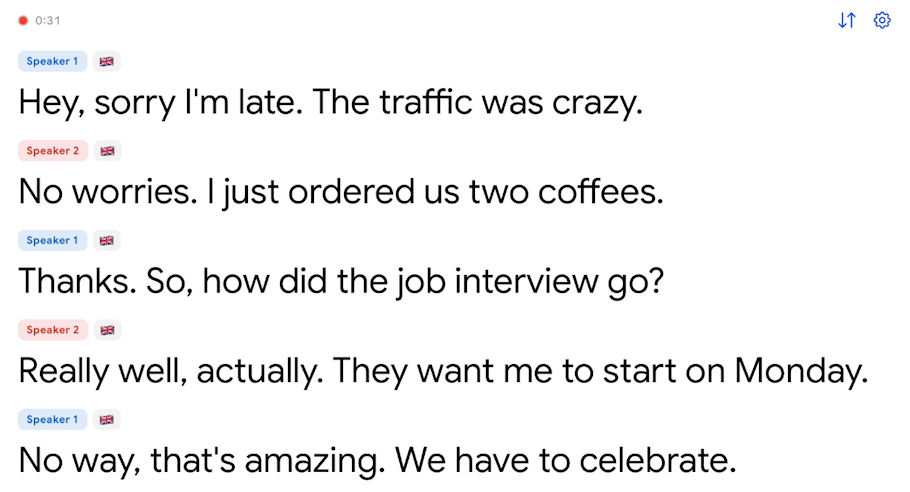
To start, tap the microphone on the home screen and lay the phone face up between the speakers. Captio AI then fills the screen with live captions and marks each voice.
- Captions with the screen locked. On iPhone, Captio AI keeps captioning when the screen locks, so the full text is there when you unlock it.
- Speaker direction. On iPhone 16 and later, waves at the edge of the screen grow on the side the current voice is coming from, in the colour of that speaker's name tag. This works best with the phone flat on the table.
- Names on each line. When someone whose voice you saved is talking, Captio AI shows their name above their lines. Voices it does not know appear as Speaker 1, Speaker 2 and so on. Voice recognition runs on the phone, and saved voices never leave it.
It helps to tell people at the start that your phone is captioning, so they know why it is on the table and can take turns to speak. Captio AI's guide on how to see who is talking in live captions explains speaker labels in more detail.
Two-way Translation
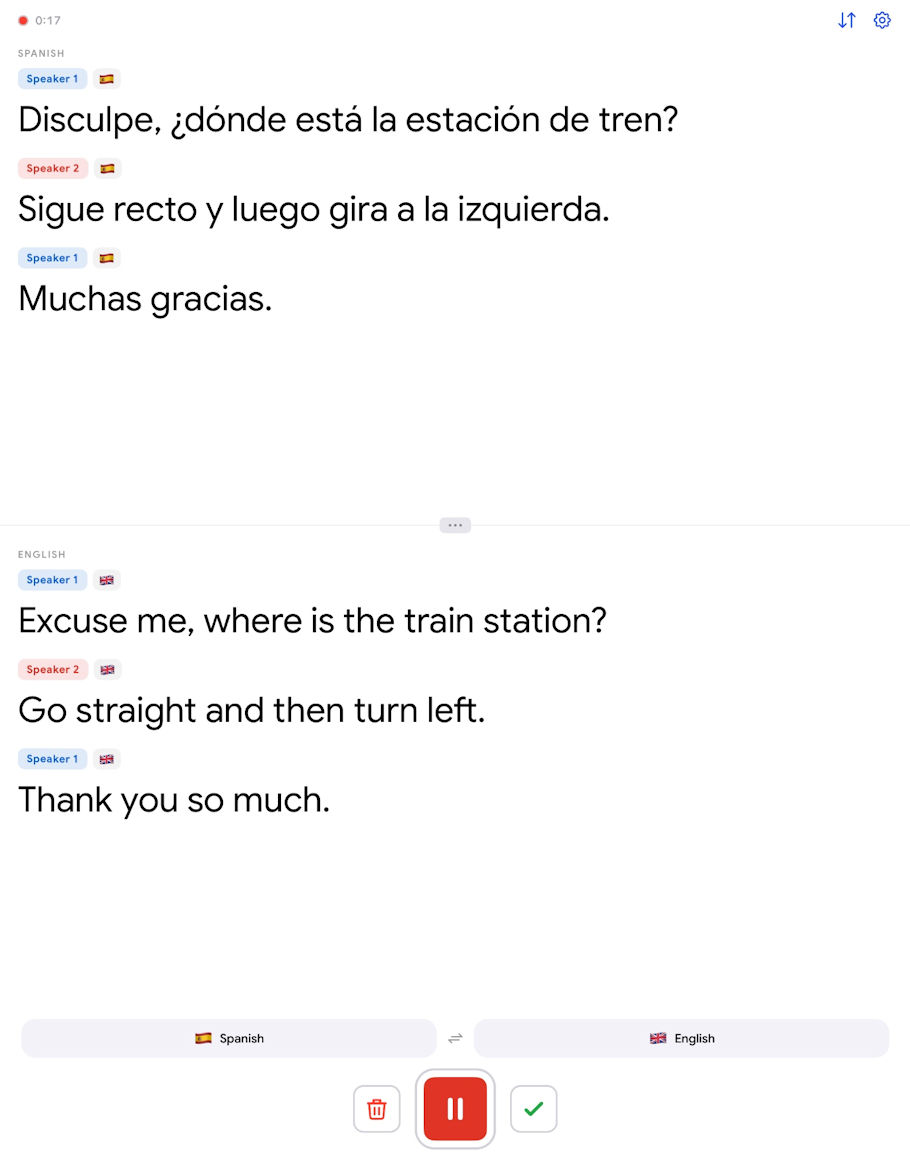
Captio AI captions speech in 60 languages and can translate a conversation between two of them in both directions. Tap Translate, choose the two languages and place the phone between the two speakers. The screen splits in two, and each half shows the whole conversation in one language, so each person reads the other's words in their own. A rotate button turns one half upside down for the person sitting opposite.
After the Conversation
Captio AI saves every conversation as text, so you can read it again later.
- Folders. Saved conversations can be grouped into folders by person or topic.
- Summaries. The Actions tab turns a long conversation into a summary, key points or a to-do list.
- Sharing. A conversation can be sent as text, a PDF or an email, for instance to someone who was not there.
- Audio and video files. Captio AI can also turn an uploaded audio or video file, such as a voice message, into text.
- Fixing words. Words Captio AI was unsure about have a thin red wavy line under them. Long-press any word to correct it: the change is made everywhere in that conversation, and the word can be saved for next time.
Availability
Captio AI is available on the App Store for iPhone (iOS 15.1 or later) and iPad, and on Google Play for Android. More examples of how it is used are on the Captio AI page about live captions for deaf and hard of hearing people (https://captioai.app/use-cases/deaf-hoh-communication).
Frequently Asked Questions
NOTE: Researched FAQs by Disabled World (DW)
What is the difference between live captions and a sign language interpreter?
Live captions convert speech into written text in real time, while a sign language interpreter translates spoken language into a signed language such as American Sign Language. Many Deaf people whose first language is sign language prefer an interpreter for complex discussions, while people who lost their hearing later in life often rely more on captions, and the two can be used together.
How accurate are automatic live captions?
The accuracy of automatic speech recognition depends on background noise, microphone placement, accents, speaking speed and whether several people talk at once. Placing the phone close to the speakers in a quiet room, asking people to take turns and adding unusual names or terms ahead of time usually improves results.
Can a captioning app replace hearing aids or cochlear implants?
No. A captioning app provides a visual text alternative to sound, while hearing aids and cochlear implants are medical devices that amplify sound or deliver it to the auditory nerve. Many people use both, relying on captions in noisy places or group conversations where their devices struggle.
Are live captions helpful for seniors with age-related hearing loss?
Yes. Age-related hearing loss, known as presbycusis, often makes speech sound muffled and harder to follow in noisy rooms. Live captions give older adults a written backup during conversations, appointments and phone calls, which can reduce strain and help them stay involved in social settings.
What is speaker diarization?
Speaker diarization is the process speech recognition software uses to split audio into segments and work out which voice spoke each one. It lets a transcript separate lines by speaker, either with generic labels or with names when a voice has been enrolled ahead of time.
Is it legal to caption or record a conversation on a phone?
Laws vary by state and country, and some places require consent from everyone in a conversation before it is recorded. Captioning for personal accessibility is widely accepted, but it is good practice to tell others that your phone is captioning and to check local rules before saving or sharing a transcript.
Do US employers and schools have to provide captioning for deaf people?
Under the Americans with Disabilities Act, and for schools also Section 504 and the Individuals with Disabilities Education Act, employers and educational institutions generally must provide effective communication, which can include real-time captioning or sign language interpreters, unless it creates an undue hardship. A personal captioning app can supplement these services but does not automatically meet those obligations.
What other tools help deaf and hard of hearing people follow conversations?
Options include hearing loop systems, remote microphone systems, sign language interpreters, CART services with a trained human captioner, captioned telephones, visual alerting devices and video relay services. The best combination depends on the setting, the person's level of hearing and their preferred way of communicating.
Reference
World Health Organization, Deafness and hearing loss (https://www.who.int/news-room/fact-sheets/detail/deafness-and-hearing-loss), fact sheet, updated 3 March 2026
Insights, Analysis, and Developments
Editorial Note: Captioning apps have been around for years, but most treat a conversation as one continuous stream of words, which leaves a deaf or hard of hearing reader guessing who is talking once three or four people join in. Captio AI's approach of tying captions to named voices, while keeping those voice profiles on the device instead of in the cloud, addresses both the practical and the privacy side of that gap. The record it keeps afterward may be just as valuable as the live view: saved transcripts can be sorted into folders, condensed into a summary, key points or a to-do list, and shared as text, a PDF or an email with someone who missed the discussion. For people who have trouble catching details at a doctor's visit, a family meeting or a work call, that written record works as a dependable memory aid, and the ability to transcribe voice messages and video files extends the same access to recorded audio. The app runs on iPhone with iOS 15.1 or later, iPad and Android, and it works best when the phone lies flat between speakers and everyone at the table knows it is captioning.*
* Editorial additions by Ian C. Langtree.