Playnook Games: Free Accessible Browser Games for Everyone
Author: Haroon Mustafa
Published: 15 Oct 2026 - Updated: 28 Oct 2026
Publication Type: Gaming
Table of Contents:
Synopsis - Definition - Overview - FAQs - Insights, Updates - Related Content
Synopsis
This product is a free collection of 16 classic browser games, including Chess, Checkers, Sudoku, Minesweeper, Solitaire, Connect Four and Word Nook. One developer in Peshawar, Pakistan built it with accessibility as a core design goal. The games run on phones, tablets and computers with no downloads, accounts or captchas. That removes common barriers for players with disabilities, seniors and anyone who finds app stores and login forms frustrating. The colors are high-contrast and were adjusted to meet WCAG contrast guidelines. Pinch-to-zoom works everywhere for people with low vision, the text is large and simple, and standard web landmarks help assistive technology move through each page. Most games are turn-based with no time limits, so players can think at their own speed. The information is useful because it is specific and candid. It explains exactly which accessibility steps have been taken, and it says openly that screen reader support for blind players is still being tested rather than claiming the work is finished. That makes it a practical starting point for caregivers, teachers, occupational therapists and accessibility professionals looking for low-barrier games.*
At a Glance
- 1 - The site scores close to 100 for accessibility in Google PageSpeed tests.
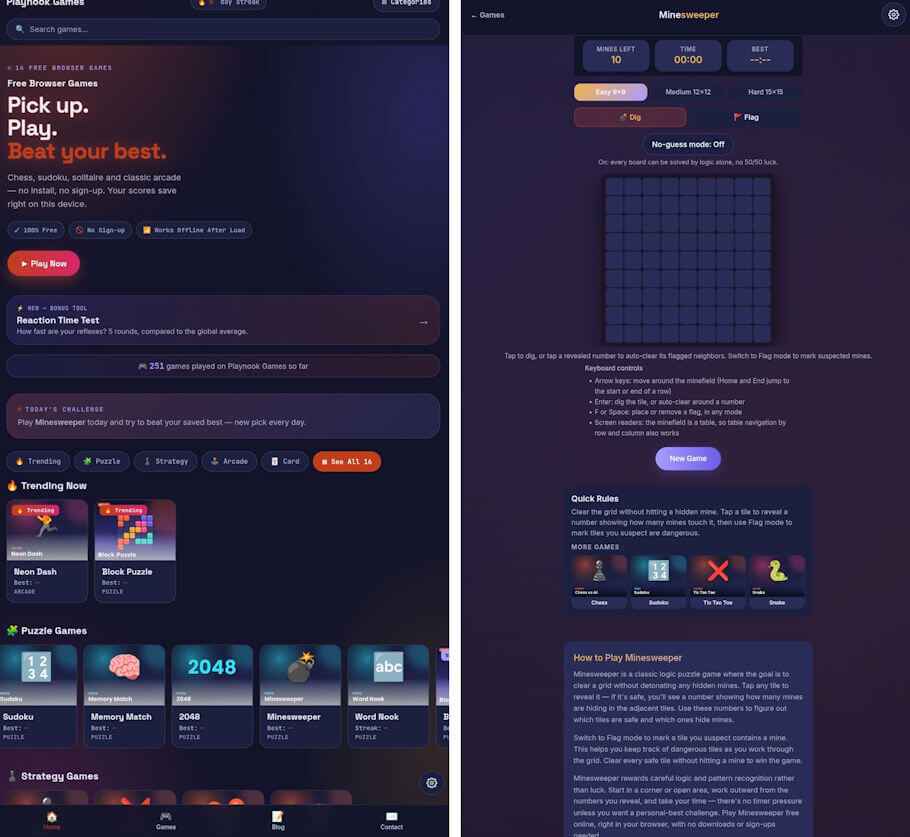
- 2 - Minesweeper offers a No-guess mode where every board can be solved by logic alone, so luck never decides the outcome.
- 3 - Achievements and daily streaks add motivation, and Tic Tac Toe, Connect Four and Checkers can be played online with a friend.
- 4 - Block Puzzle dropped drag-and-drop after real device testing showed it was unreliable. Players now tap a piece, move it with large arrow buttons, and use Rotate and Place Block buttons instead.
Topic Definition
- Accessible Browser Games
Accessible browser games run directly in a web browser and are designed so people with a wide range of abilities can play them without special software or extra steps. They usually skip downloads and account sign-ups, use high-contrast colors and readable text that meet WCAG guidelines, and allow zooming. They rely on simple taps or large buttons rather than precise gestures like dragging. Many also remove time pressure and follow standard page structure, so assistive tools such as TalkBack, VoiceOver and keyboard navigation can read the content. The goal is to let players with visual, motor, cognitive or age-related limitations enjoy the same games as everyone else on phones, tablets and computers.
Overview
Playnook Games: Free Browser Games Built With Accessibility in Mind
Playnook Games (https://playnookgames.com) is a free collection of 16 classic browser games, including Chess, Checkers, Sudoku, Minesweeper, Solitaire, Connect Four, Tic Tac Toe, Memory Match, 2048, Snake, Block Puzzle and Word Nook. The site was created by Haroon Mustafa, a solo developer from Pakistan, with one simple goal: games that anyone can open and enjoy, on any device, without barriers.
No Downloads, No Sign-ups
Every game runs directly in the web browser on phones, tablets and computers. There is nothing to install and no account to create. This matters for many players with disabilities, because each extra step, such as app store searches, login forms or captchas, can become a real obstacle. On Playnook Games, a player taps a game and starts playing.
Designed for Clear Vision and Easy Reading
The site uses a bright, high-contrast design, and colors were checked and adjusted to meet WCAG contrast guidelines. The site scores close to 100 for accessibility in Google's PageSpeed tests. Pinch-to-zoom is fully enabled, so players with low vision can enlarge any part of the screen. Text is kept large and simple, and page structure follows standard web landmarks so assistive technology can move through the pages more easily.
Controls That Do Not Depend On Precise Movements
Many puzzle games rely on dragging pieces with a finger, which can be difficult for players with tremors, limited hand mobility or motor disabilities. While building Block Puzzle, drag-and-drop was tested on real devices and found to be unreliable, so it was replaced completely. Players now select a piece with a single tap, move it with large on-screen arrow buttons, rotate it with a Rotate button and place it with a Place Block button. The same thinking, large targets and simple taps instead of fine gestures, guides the other games too.
Play At Your Own Pace
Most games are turn-based with no time pressure, so players can think and move at a comfortable speed. Minesweeper includes a No-guess mode, where every board can be solved by logic alone, removing frustrating luck. Each game includes achievements and daily streaks for motivation, and Tic Tac Toe, Connect Four and Checkers can also be played online with a friend.
Screen Reader Support: Work In Progress
Full screen reader support is the next big goal. Some games are being tested with TalkBack on Android, but testing has shown that more work is needed before they can be called fully accessible to blind players. Rather than making claims that are not yet true, Playnook Games is sharing this honestly and inviting feedback.
UPDATE: A new Screen reader mode is available in the site's Settings panel. When it is switched on, it pauses ads so that TalkBack speech is not interrupted. 2048 has been tested and played with TalkBack on Android, using large arrow buttons and a Read Board button that announces the whole board. The Settings panel also offers dark and high-contrast themes, larger text, colorblind-friendly colors and reduced motion. Other games, including Sudoku and Chess, are still being tested.
An Open Invitation to Players
The best way to make games truly accessible is to listen to the people who use them. Players with disabilities, as well as caregivers, teachers and accessibility professionals, are warmly invited to try the games and share what works and what does not. Every suggestion helps shape the next updates.
Playnook Games is completely free to play at https://playnookgames.com. Feedback can be sent to haroone93@gmail.com.
About the Developer
Haroon Mustafa runs Haroon Studio from Peshawar, Pakistan, building simple, useful web tools and games designed to work for everyone.
Frequently Asked Questions
NOTE: Researched FAQs by Disabled World (DW)
What is WCAG and why does color contrast matter in games?
WCAG stands for Web Content Accessibility Guidelines, a set of standards from the World Wide Web Consortium for making web content usable by people with disabilities. Strong color contrast between text, game pieces and backgrounds helps players with low vision, color blindness or aging eyes see the board clearly.
How do I turn on TalkBack on an Android phone?
Open Settings, tap Accessibility, then select TalkBack and switch it on. You can also set a volume key shortcut so TalkBack can be turned on or off quickly by holding both volume keys.
How can I zoom in on a web page on a phone or tablet?
Place two fingers on the screen and spread them apart to enlarge the page, then pinch them together to zoom back out. Both iPhone and Android also offer a system-wide magnification feature in their accessibility settings.
What types of games work best for people with hand tremors?
Turn-based games with large tap targets, such as chess, checkers, sudoku and card games, tend to work best because they do not require speed or precise dragging. Games that confirm each move with a button press also help prevent accidental moves.
Are free browser games safe for seniors and children?
Browser games that require no downloads or accounts carry less risk because nothing is installed and no personal information is collected at sign-up. It is still wise to choose sites with clear contact details and to avoid games that push frequent pop-up ads or purchase prompts.
Can puzzle games help keep the mind active as people age?
Puzzles like sudoku, word games and chess give the brain regular practice with memory, planning and problem solving, and many older adults find them a relaxing daily habit. Research on long-term cognitive benefits is mixed, so they work best as one part of an active lifestyle that also includes social contact and physical activity.
Do browser games work without an internet connection?
Most browser games need an internet connection to load the first time, and online play with friends always requires a connection. Some single-player games may keep working briefly if the page stays open, but this depends on how each site is built.
What should I include when giving accessibility feedback to a game developer?
Describe the device, browser and any assistive technology you use, such as a screen reader or switch control. Then explain which game you were playing, what you tried to do and where it became difficult, since specific details help developers reproduce and fix the problem.
Insights, Analysis, and Developments
Editorial Note: What stands out here is less the list of games than the process behind them. The developer tested drag controls on real phones and saw they failed people with tremors and limited hand mobility. Instead of defending the original design, he rebuilt the controls around taps and large buttons. That kind of choice matters for older adults, people with motor disabilities and anyone recovering from a hand or wrist injury, since fine gestures are often where casual games quietly shut players out. The project is still young and openly a work in progress. Its request for feedback from players, caregivers, teachers and accessibility professionals suggests that real users, not guesswork, will shape the next updates.*
* Editorial additions by Ian C. Langtree.