Paper2Audio: AI Text-to-Speech App for Documents and Books
Author: Joe Golden
Published: 30 Oct 2026
Publication Type: Product Release, Update
Table of Contents:
Synopsis - Definition - Overview - FAQs - Insights, Updates - Related Content
Synopsis
This product is an AI-powered text-to-speech app that converts complex documents such as research papers, textbooks, technical PDFs and ebooks into clear, natural-sounding audio, with a particular focus on people with visual impairments, dyslexia, ADHD and other conditions that make reading difficult. Unlike traditional tools that read every word on the screen verbatim, Paper2Audio recognizes document structure, skipping headers, footers, page numbers and citations while correctly voicing numbers, symbols, equations and technical terms. It runs on iOS, Android and the web, and is free for personal use, with paid plans for heavier users. The timing is notable: the New York Times, the Washington Post and the Wall Street Journal now offer AI narration on their articles, and a Zearn study of 58,000 students found that more natural AI voices led to 20 percent more text-to-speech use. For seniors with declining eyesight, students with learning disabilities and anyone who takes in information better by listening, it offers a practical way through dense material that standard tools often mangle.*
At a Glance
- 1 - Playback speed can be set anywhere from 0.5x to 4x.
- 2 - The app supports documents in 32 languages, and voices can be changed mid-listen.
- 3 - Reader View highlights each word as it is spoken, with fonts like Atkinson Hyperlegible and OpenDyslexic available.
- 4 - Documents are private by default, but audio can be embedded on WordPress, Substack or any HTML site using an iframe snippet.
Topic Definition
- AI Text-to-Speech
AI text-to-speech is technology that uses machine learning models to convert written text into spoken audio with natural rhythm, intonation and pronunciation. Older speech synthesis systems stitched together recorded sounds or followed fixed rules, producing the flat, robotic voices many people associate with early screen readers. Modern neural voices are trained on large amounts of recorded human speech, so they handle pacing, emphasis and unfamiliar words far more convincingly. More advanced tools also analyze document layout, so headers, page numbers, citations, tables and equations are skipped, summarized or read correctly rather than spoken verbatim. The technology is widely used by people who are blind or have low vision, people with dyslexia, ADHD or other print disabilities, and anyone who prefers to listen while commuting, exercising or doing other tasks.
Overview
Paper2Audio: Text to Speech App for Any Doc or Book
Text-to-speech is growing in popularity as recent advances in artificial intelligence make listening to written content more accessible and enjoyable. Major publications including the New York Times, the Washington Post, and the Wall Street Journal have added more natural AI-narration directly to their articles (Bartholomew, 2026). In 2025, Foreign Affairs magazine experienced a 72% year-over-year increase in audio listening (Pugpig, 2025). Additionally, better AI voices are also improving educational access: a randomized study by Zearn involving 58,000 students found that students with access to more natural-sounding AI voices utilized text-to-speech 20% more frequently than those using conventional computer-generated voices (O'Sullivan, 2025). Despite these advances and clear increased demand, turning complex documents like research papers, textbooks, and technical PDFs into accurate audio remains a challenge.
Traditional text-to-speech tools often read every word on a screen verbatim without accounting for document structure. This can result in unintended or confusing narration of items like headers and footers, page numbers, or visual elements like tables or graphs. Paper2Audio handles these types of issues well, making it easy to listen to complicated materials with clear, natural-sounding audio. It also works with simpler materials, including ebooks, web articles, and plain text.
Paper2Audio aims to make written information easier to access and understand for everyone, with a particular focus on people with visual impairments, dyslexia, ADHD, and other conditions that can make reading difficult.
Paper2Audio is available on iOS, Android and on the Paper2Audio website. Paper2Audio is free to use for personal use (up to 56 hours of audio per week), and also offers paid subscription options with more hours and higher audio and file/size limits.
Features
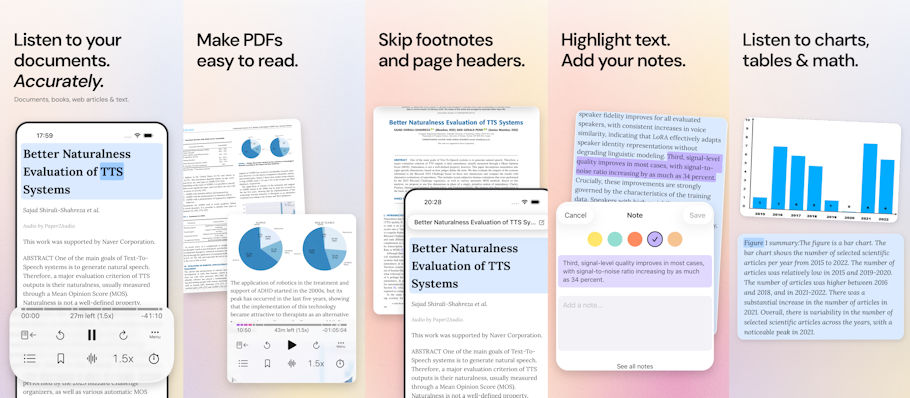
- Skip unnecessary content: Automatically removes headers, page numbers, citations, and other distractions to spend less time listening to things that aren't useful. This helps listeners stay focused on the main text.
- Accurate narration: Clean up complex text, including numbers, symbols, equations, and technical terminology. This is particularly valuable for people who rely on audio and cannot easily refer back to the original document to interpret confusing passages.
- Reader View, an optimized version of the audio transcript with synchronized highlighting: Reformats PDFs and other documents into a mobile-friendly, single-column reading view, to help easily switch between reading and listening. It preserves content like tables, images, and document formatting so you can easily follow along with your audio without missing any context. Words are highlighted as they are spoken, helping users follow along with the audio. Reading and listening together can be especially useful for people with dyslexia, ADHD, or difficulty maintaining focus while reading.
- Natural voices and adjustable playback: Supports documents in 32 languages. Preview and change voices directly in the player at any time while listening, and adjust playback speeds from 0.5x to 4x to match learning preferences and needs.
- Tables, equations, and code: Choose to have visual elements in documents summarized in plain language, read in full, or skipped. AI-generated descriptions can make information contained in figures and tables more accessible to people with limited vision or anyone who finds it difficult to interpret dense visual information.
- Adjustable reading appearance: Customize fonts, including Read along using dyslexia-friendly fonts like Atkinson Hyperlegible and OpenDyslexic. Change font size, line spacing, and text width to better fit visual needs.
- Screen-reader compatibility: Supports Apple's VoiceOver on iOS and Google's TalkBack on Android. Buttons and controls have accessible labels and important playback controls are button-compatible.
- Offline listening: Generate a full audio file to listen when you don't have an internet connection, without using up any additional weekly processing limit.
- Notes, bookmarks, and highlighting: Mark important passages and take notes right in the document, and sync your markups across devices.
- AI Chat: Learn more from reading by asking questions about documents, summarizing sections, and clarifying unfamiliar concepts. Try using it when you need specific information from a long document without searching through it manually.
- Publicly share documents (they are private by default), including embedding the audio directly onto a webpage with an iframe snippet pasted into WordPress, Substack, or any site that supports HTML. Useful for authors and educators who want to offer accessible audio versions of their written work.
Paper2Audio's goal is to make written information easier for everyone to access. By combining advanced document processing, natural-sounding narration, and customizable accessibility tools, Paper2Audio helps make even complex written materials more approachable.
Frequently Asked Questions
NOTE: Researched FAQs by Disabled World (DW)
What is the difference between a screen reader and a text-to-speech app?
A screen reader is assistive software that reads out everything on a screen, including menus, buttons and controls, so blind and low-vision users can operate a device. A text-to-speech app focuses on reading documents or articles aloud, and many work alongside screen readers such as VoiceOver and TalkBack.
Can text-to-speech help people with dyslexia?
Yes. Listening while following highlighted text, often called read-along or bimodal reading, can reduce decoding effort and improve comprehension for many people with dyslexia. Pairing audio with dyslexia-friendly fonts and wider line spacing can make longer reading sessions less tiring.
Are AI voices better than traditional computer voices for learning?
Natural-sounding AI voices are generally easier to listen to for long periods because they use more human rhythm and emphasis. Research in education has found that students are more likely to keep using text-to-speech when the voice sounds natural rather than robotic.
What file types can usually be converted to audio?
Most modern text-to-speech tools accept PDFs, Word documents, EPUB ebooks, web pages and plain text. Scanned PDFs need optical character recognition first, so check that an app can read image-based pages before relying on it.
Is it safe to upload personal or confidential documents to a text-to-speech app?
It depends on the provider. Before uploading medical records, legal papers or work files, read the privacy policy to see how documents are stored, whether they are used to train AI models, and how they can be deleted.
Can text-to-speech read math equations correctly?
Basic tools often read symbols literally or skip them, which can make equations meaningless. Newer AI-based apps try to interpret notation and speak it the way a person would, but complex math may still need checking against the original.
Can text-to-speech be requested as an accommodation at school or work?
Yes. Text-to-speech is a common accommodation under the Americans with Disabilities Act and in student IEP and Section 504 plans. Students and employees can request it formally so it is allowed during tests, assignments and job tasks.
What playback speed is best for listening to documents?
Many people start near normal speaking speed and gradually increase it as they get used to the voice. Experienced listeners, including many blind users, often listen at twice normal speed or faster, while slower speeds can help with dense or unfamiliar material.
Sources
Bartholomew, J. (2026, August 6). All the news while doing the dishes. Columbia Journalism Review.
O'Sullivan, A. (2025, June 30). Zearn boosts math accessibility with Amazon Polly's AI-powered text-to-speech. AWS Public Sector Blog.
Pugpig. (2025, July 31). Pugpig media app report 2025.
Insights, Analysis, and Developments
Editorial Note: For a long time, text-to-speech meant a flat robotic voice stumbling over page numbers, footnotes and table cells, which made it a poor fit for exactly the readers who needed it most. Paper2Audio reflects a broader shift in assistive technology, where AI is used not just to speak text but to understand how a document is built and decide what is worth reading aloud. Tables and equations can be summarized in plain language, read in full or skipped, offline audio files do not count against weekly limits, and the app works with Apple's VoiceOver and Google's TalkBack. With Foreign Affairs reporting a 72 percent jump in audio listening in 2025, the demand is clearly there, and tools that handle academic and technical writing well could make a real difference for blind and low-vision users, people with dyslexia or ADHD, and older adults who find small print increasingly tiring.*
* Editorial additions by Ian C. Langtree.